I introduced and evolved core AI features at Pipefy — contextual agent suggestions, AI fields, card summaries, and awareness surfaces — to reduce cognitive load, improve discoverability, and drive confident AI adoption across workflows.
Role
Product Designer (end-to-end)
Timeline
Jan – Dec 2025 · 12 months
Team
1 designer, 1 PM, 4 devs
Platform
Web · Pipefy
Context
Invisible AI creates distrust, not adoption
As AI capabilities advanced at Pipefy, users faced a recurring challenge: they couldn't easily understand where AI was acting, why, or what impact it had. This caused friction across four key dimensions:
01
Trust
"Did AI change this field? Can I rely on it?"
02
Governance
"Who controls when AI acts? Can I review or revert a change?"
03
Discoverability
"I would use AI… if I knew where to start."
04
Operational clarity
"Is AI helping me or interfering with my work?"
Many users were also unaware of which AI agent templates existed, how agents could automate repetitive tasks, and where AI could fit into their workflows. To unlock real adoption, we needed to introduce AI in a way that felt transparent, contextual, safe, and genuinely useful.
The Challenge
Bring AI into the product without turning the platform into a black box
This required designing features that would clearly communicate what AI did and when, strengthen trust through field-level visibility and traceability, surface AI opportunities at the right moment, and help users make informed, confident decisions.
The challenge wasn't "more AI." It was better AI — predictable, explainable, governed, and understandable.
This meant redesigning not just interfaces, but communication patterns — building a shared visual and verbal vocabulary that made AI legible to the people who need to trust it in their daily operations.
My Role
End-to-end execution with varying degrees of strategic influence
I was the designer responsible for end-to-end execution across the AI features, with different degrees of strategic influence depending on the delivery.
1
AI Agent Suggestions & AI Fields — conceptual lead
I defined what AI fields are, how they differ from regular fields, and how the suggestion system should behave in relation to the user's process. I worked closely with the PM on rollout sequencing and with Engineering to establish what was technically feasible without compromising user trust.
2
Card Summary & AI Field Visibility — execution, prototyping, and validation
These deliveries had less scope ambiguity. For AI Field Visibility, the risk was adding visual noise to already dense records — I ran a controlled beta before full rollout. For Card Summary, processing time proved to be a friction point for users who rely on the feature for quick triage.
3
Awareness Surfaces — creation and cross-functional coordination
I translated behavioral patterns into placement recommendations and made sure in-product education was consistent with the external rollout communication.
4
Agent Templates — full page design, structure, naming, and instructional content
I designed the entire templates page — its layout, information hierarchy, naming conventions, and instructional content. This is the surface users land on when activating AI-generated suggestions, so every word and structure decision directly shaped whether they felt confident enough to proceed.
Process
Discovery started with a wrong hypothesis
We assumed the main barrier to AI adoption was distrust in results — that users were rejecting AI because they were afraid of errors. Interviews revealed something different: most users had never gotten to the point of evaluating a result because they didn't know the feature existed or couldn't see where it applied to their process. The problem came before trust — it was about discoverability and comprehension. That finding reoriented the entire project.
1
Behavioral mapping — Mixpanel & Session Replay
We mapped the highest-friction and highest drop-off moments in the product. The behavioral data confirmed that the barrier wasn't technical — it was cognitive. Users didn't know what to do next, and AI was acting invisibly in places where it needed to explain itself.
2
Iterative prototyping and testing per feature
Not everything worked on the first try. With Card Summary, processing time was too long for users who needed speed — which directly contradicts the feature's core value. With AI Field Visibility, the risk was visual noise in dense records; a controlled beta before rollout validated the approach.
Solutions
Five features, one coherent intelligence layer
Each feature addressed a specific dimension of the problem. Together, they form an AI layer that is predictable, explainable, and integrated into the user's workflow — not parallel to it.
1 — AI Agent Suggestions
Intelligence from the user's own process
Discoverability
The problem: Users didn't know where to start with AI or which agents would benefit their workflow.
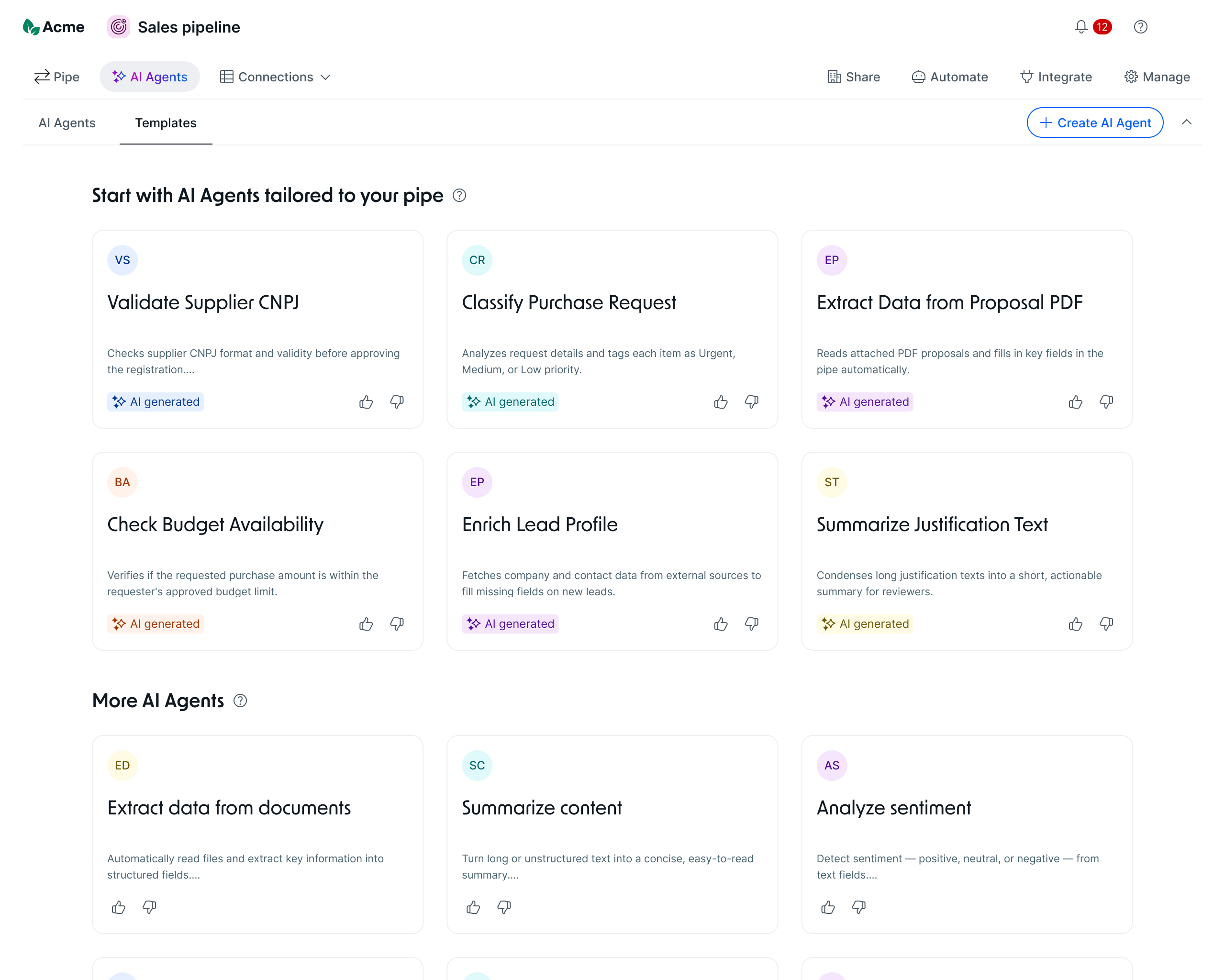
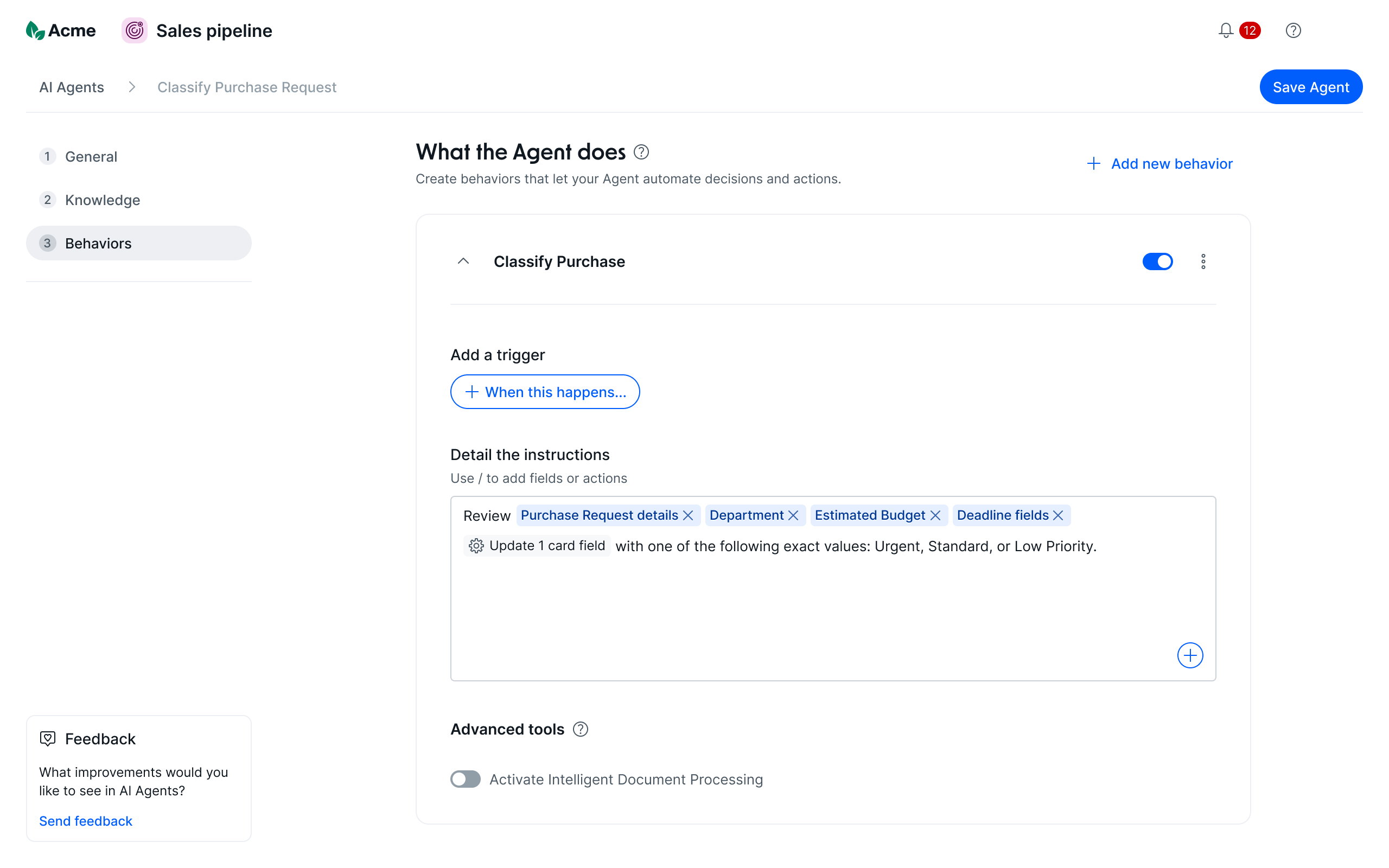
The solution: AI analyzes the structure of the user's process and automatically generates suggested agents aligned with real operational patterns. Each suggestion is clearly labeled as AI-generated, easy to review, and ready to customize. I designed the agent templates that populate these suggestions — defining their structure, naming, and instructional content so users could activate them with confidence and minimal configuration.
Templates tab — AI-generated agent suggestions based on the pipe's structure and taxonomy
Agent Studio — pre-filled behaviors and instructions from the selected template, ready to customize
2 — AI Fields
Bringing AI output directly into the workflow
GovernanceOperational clarity
The problem: AI-generated insights existed outside the card — in separate panels or summaries — but weren't integrated into the fields where decisions actually happened. Users still had to manually transfer or interpret AI output into their process.
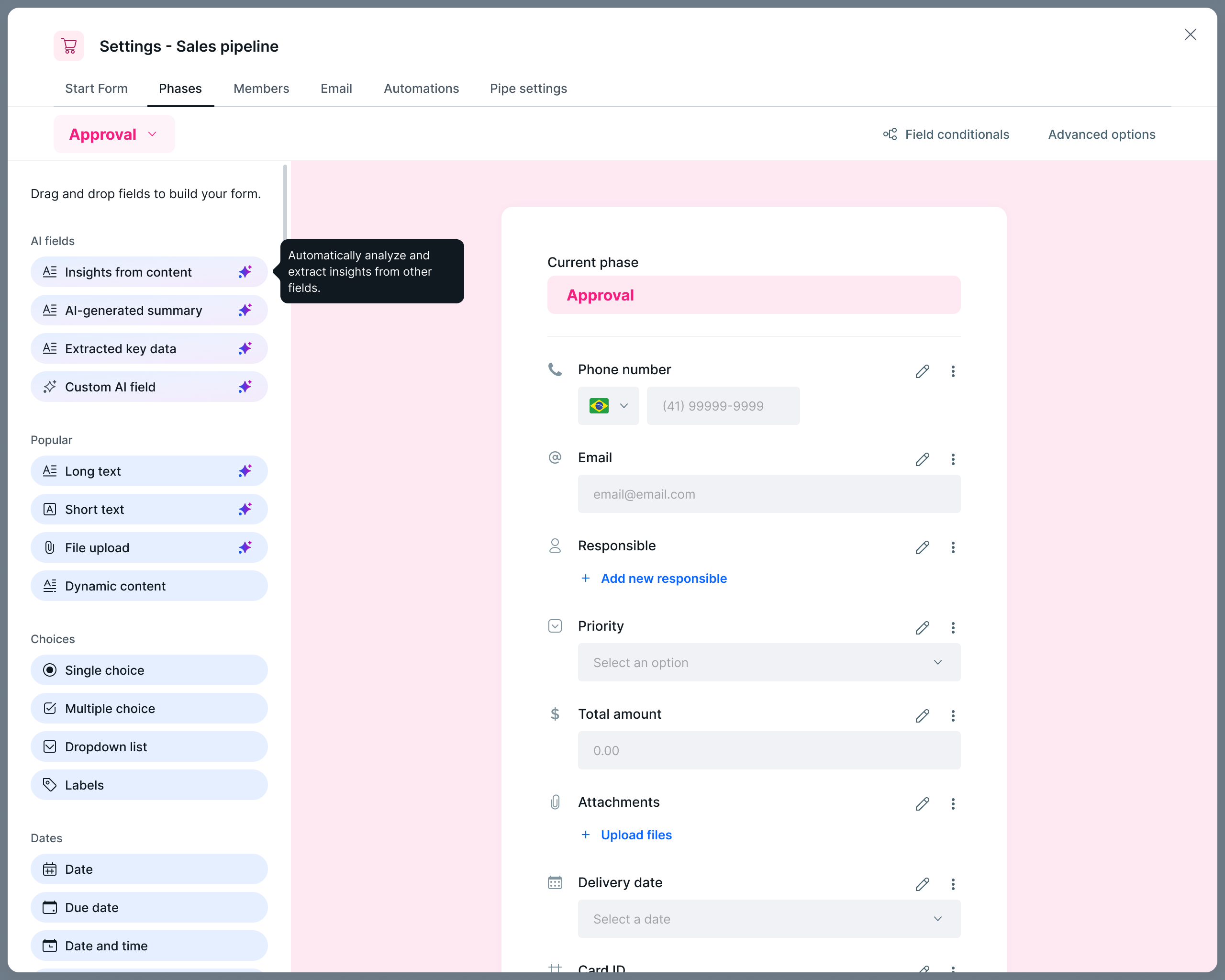
The solution: I introduced a dedicated category of AI-powered fields — Insights from content, AI-generated summary, Extracted key data, and Custom AI field — that can be added directly to any phase of a process. These fields are visually differentiated through a consistent sparkle marker, making it immediately clear which fields are powered by AI. The pattern integrates AI output where the work happens, not alongside it.
Process editor — AI fields as a dedicated category in the field picker, with a tooltip explaining what each type does
3 — Card Summary
Reducing cognitive load in daily triage
Operational clarity
The problem: Users spent significant time reading long descriptions, comments, and submissions before acting — slowing triage and creating inconsistent interpretation across team members.
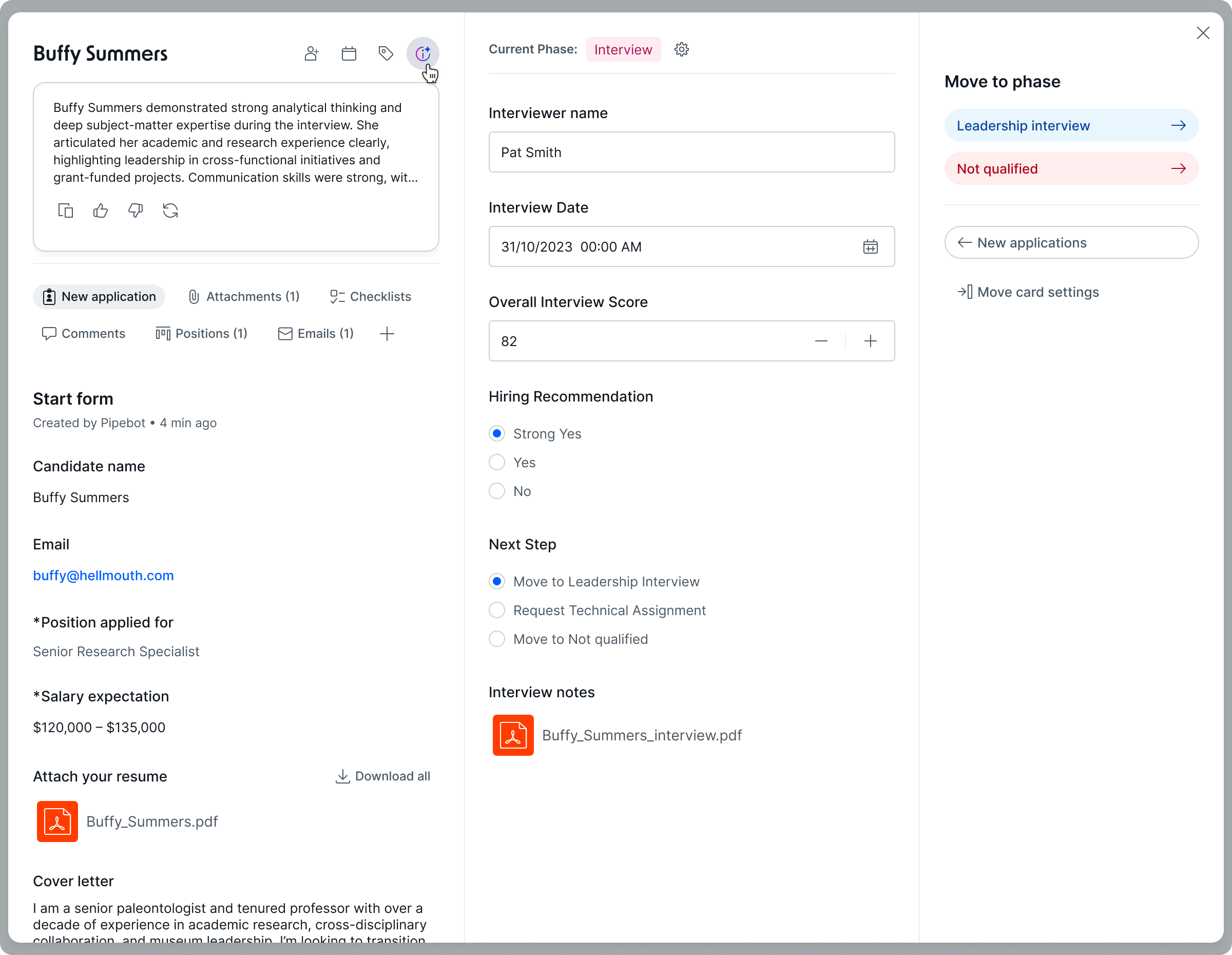
The solution: AI generates a concise, structured summary at the top of the card, highlighting the most relevant information. It's factual, scannable, and low-risk. Users can refresh or dismiss the summary, retaining full control. This accelerates triage without interfering with original data.
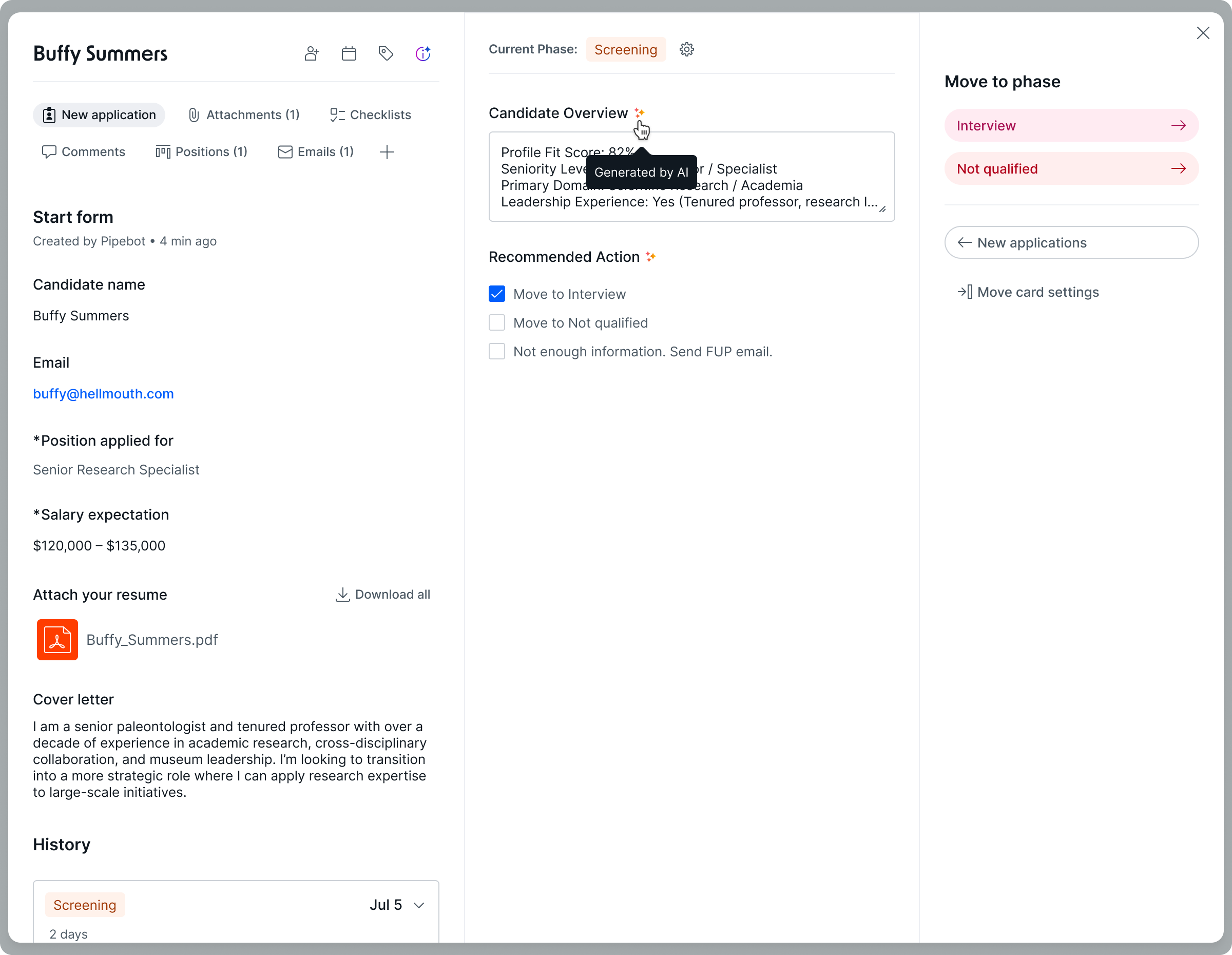
Card view — AI summary on the left, AI fields surfacing structured insights and a recommended next action in the center
4 — AI Field Visibility
Trust through transparency
TrustGovernance
The problem: When AI generated or updated fields, users couldn't see it — creating uncertainty and governance risk in critical operations.
The solution: A subtle, consistent badge marks fields impacted by AI, supported by a tooltip explaining the origin of the data. The pattern scales across cards, forms, automations, and logs, providing the transparency and predictability required for enterprise trust. A controlled beta before full rollout confirmed the badge didn't create excessive visual noise — giving us confidence to scale the pattern across the entire platform.
AI Field Visibility — the sparkle marker (✦) signals AI-generated data; the tooltip reveals the origin on hover
5 — In-product AI Awareness
Education where and when it matters
Discoverability
The problem: Users often learned about AI features only after struggling through a manual task. Documentation existed, but outside the workflow and away from moments of need.
It's like realizing you're out of toothpaste right when you're about to brush your teeth — awareness happens when the pain becomes visible.
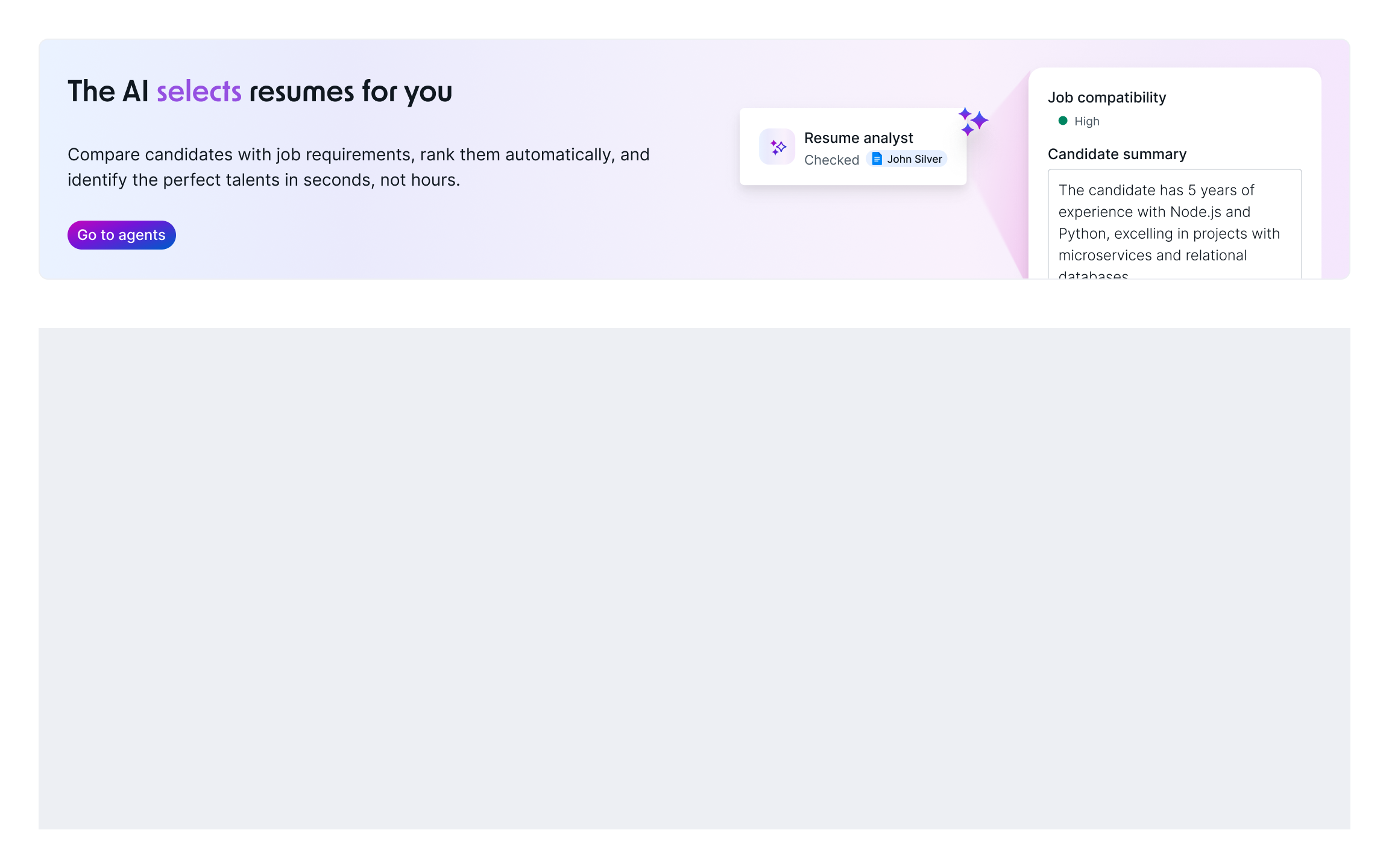
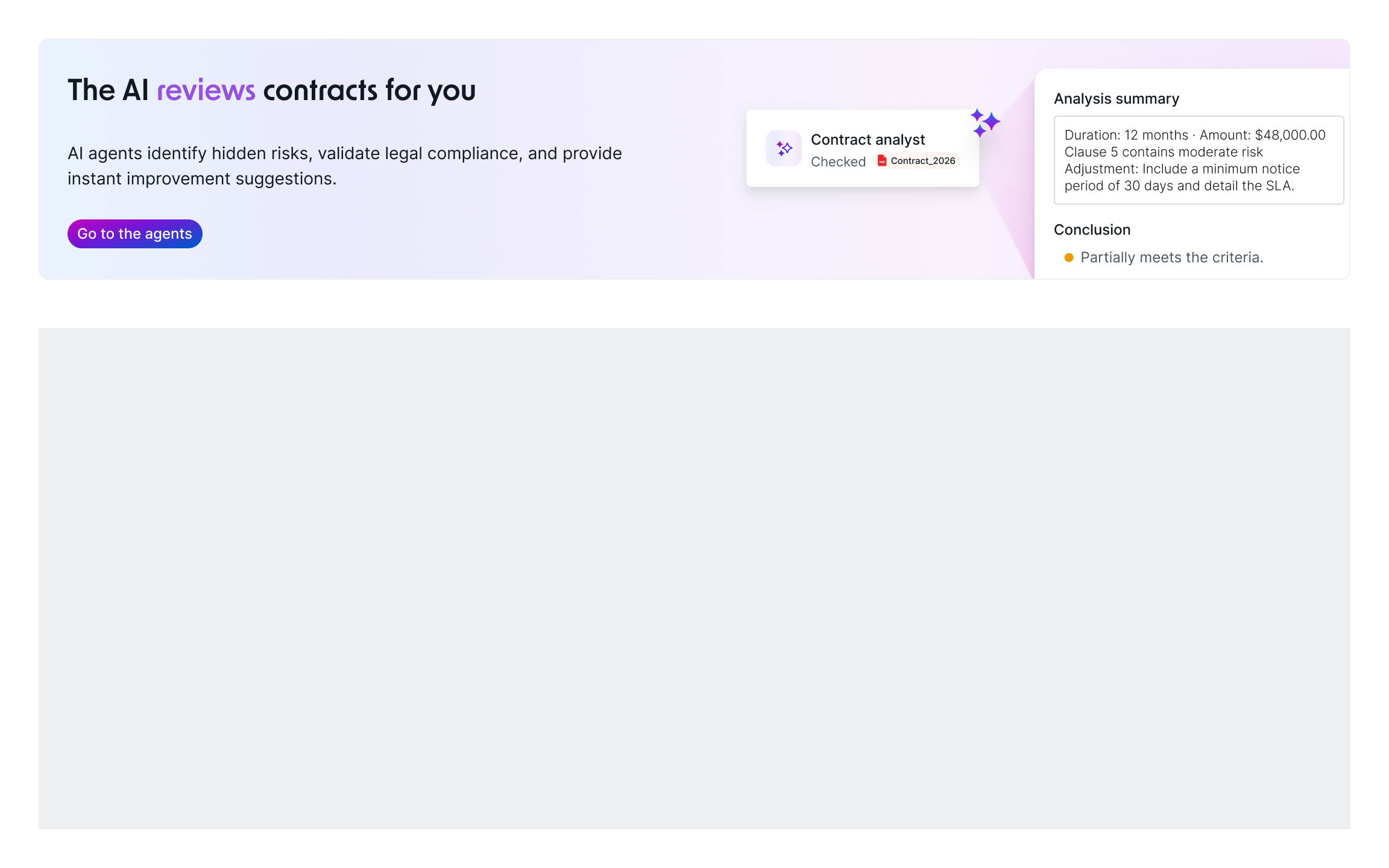
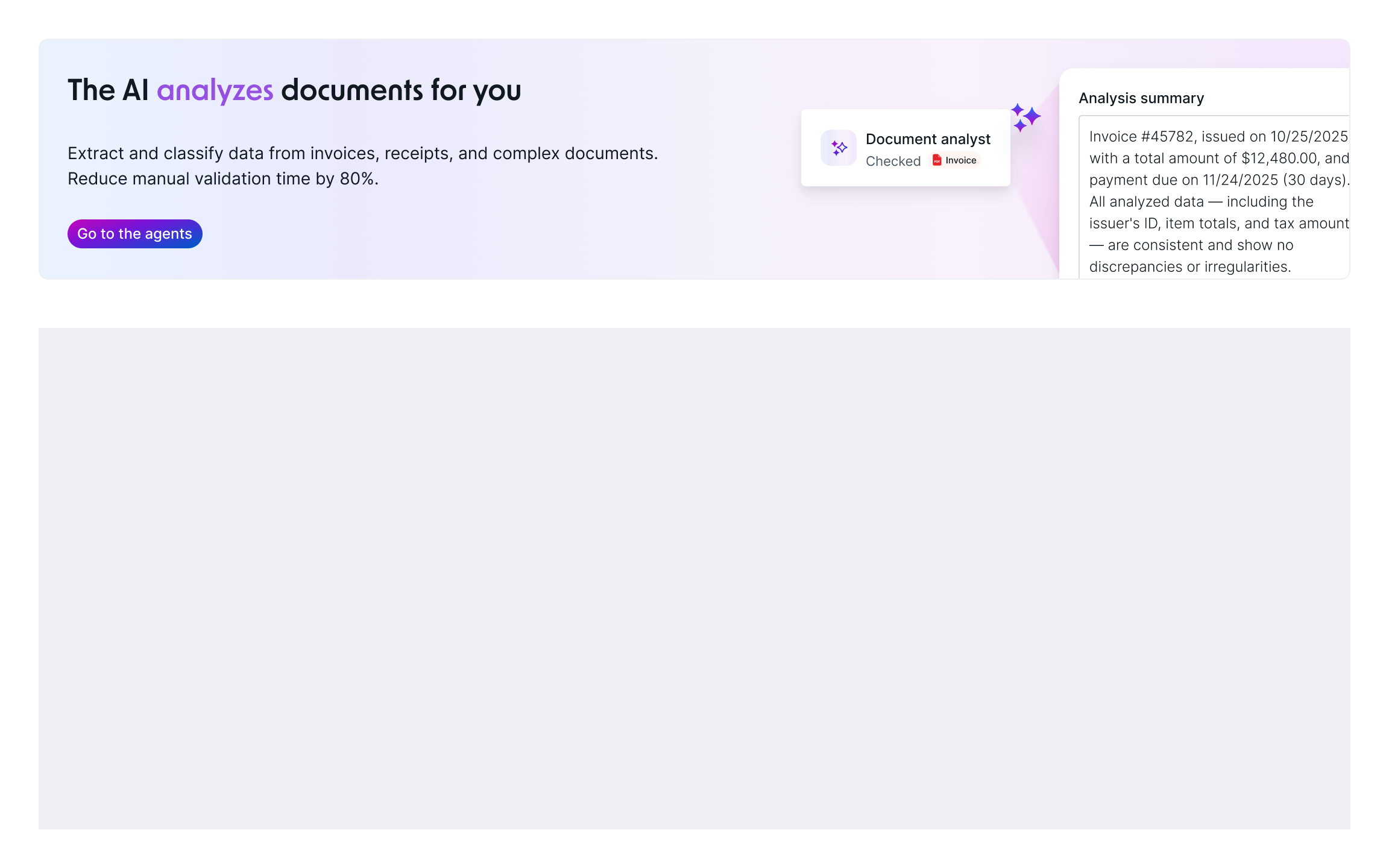
The solution: I designed contextual awareness surfaces — banners, empty states, popovers, and microcopy — placed strategically in high-friction moments. These surfaces explain what agents do, where they help, why they matter, and when to use them. By appearing at the moment users feel the friction, they increase comprehension and nudge adoption exactly when it's most effective.
Contextual banners — same pattern applied to different agent types, surfaced based on the pipe's domain
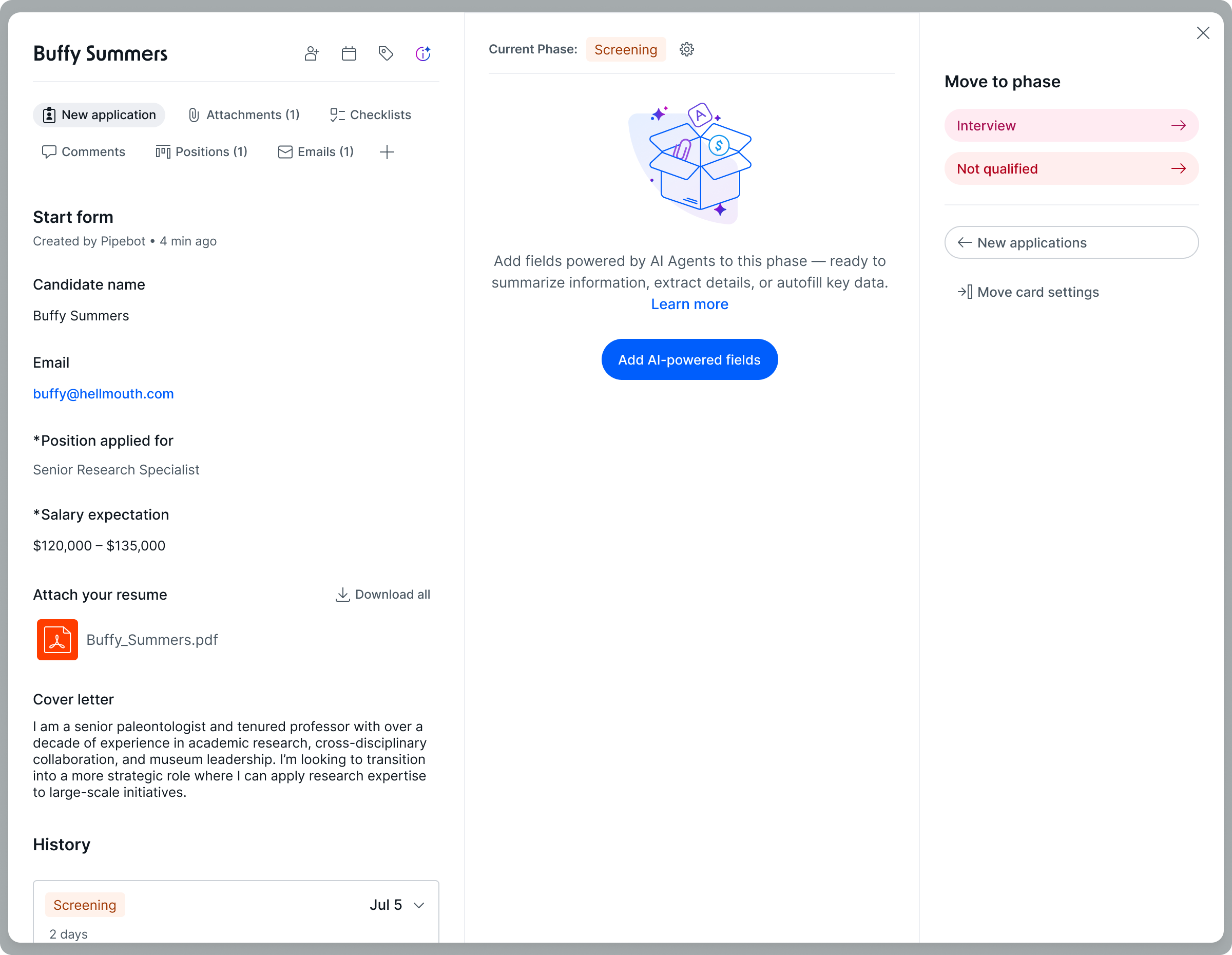
Empty state — appears when no AI fields are configured, surfacing the feature at the exact moment of need
Impact
AI that's more comprehensible, actionable, and trustworthy
In 2025, the Pipe Experience squad acted as an agent retention engine — making AI more comprehensible, actionable, and safe for admins, and connecting agent adoption to recurring value at the core of the product.
We increased retention by making AI visible and actionable for administrators.
→+66.7% more agents created per org — measured after launch of AI-generated agent templates
→28% conversion rate — from click to agent creation via AI-generated templates
→1,051 unique users/day on the New Flow after rollout
→82.7% of agents now created via Agent Studio, validating the conceptual separation and new information architecture
→+4.1% in interactions with field dependency visualization — giving admins more confidence when making process changes
→Scalable patterns adopted across future AI features, establishing a shared visual vocabulary for the product
Retrospective
What I learned
Worked well
The controlled beta for AI Field Visibility — validating the pattern in a real environment before full rollout — was decisive. We confirmed the badge didn't create excessive noise, which gave us the confidence to scale it across the entire platform without rework.
Worked well
Multi-method validation ensured real coverage: Maze answered immediate comprehension, internal pilots captured genuine usage behavior, CS surfaced friction users don't verbalize in a test setting, and Mixpanel confirmed adoption at scale. No single method would have provided the same coverage.
Would do differently
The initial hypothesis — that the barrier was distrust in results — was wrong. The real problem was discoverability. With more exploratory interviews in the first weeks, we would have reached that conclusion before investing in the wrong direction.
Would do differently
With Card Summary, I learned that response time is a design criterion, not an engineering detail. In retrospect, I would have challenged the on-demand premise from the start and proposed a proactive model — generating the summary in the background as the card opens — rather than discovering the latency as a problem during validation.